Top Digital Platforms for Managing Remote Teams
Top Digital Platforms for Managing Remote Teams
Remote work has become an important part of modern business. Companies can now build teams across different cities and countries without requiring every employee to work from the same physical office. While remote work offers flexibility and access to a wider talent pool, managing distributed teams also requires effective communication, collaboration, project management, and productivity tools.
This is where digital platforms for remote teams become valuable. The right tools can help employees communicate, organize tasks, share files, attend meetings, track projects, and stay connected regardless of their location.
In this article, we explore the top digital platforms for managing remote teams, their key features, benefits, and how businesses can choose the right tools for their remote workforce.
What Are Digital Platforms for Remote Teams?
Digital platforms for remote teams are online tools that help employees work together from different locations.
These platforms can support a variety of business activities, including:
- Team communication
- Video meetings
- Project management
- File sharing
- Task management
- Document collaboration
- Time management
- Employee coordination
- Customer communication
Instead of relying on physical offices, remote teams can use these platforms to create a connected digital workplace.
Why Remote Teams Need Digital Platforms
Managing a remote team can be challenging when employees work in different locations and time zones. Without the right systems, important information can become difficult to find and communication can become disorganized.
Digital platforms can help businesses:
Improve Communication
Employees can communicate through instant messages, video meetings, email, and project discussions.
Organize Projects
Project management tools allow teams to assign tasks, set deadlines, and monitor progress.
Share Information
Cloud-based file storage allows employees to access important documents from different devices and locations.
Increase Visibility
Managers can see project progress, upcoming deadlines, and outstanding tasks without requiring constant meetings.
Support Flexible Work
Employees can collaborate without being in the same office, making digital platforms especially useful for distributed and hybrid teams.
Top Digital Platforms for Managing Remote Teams
Different platforms are designed for different purposes. Some focus on communication, while others specialize in project management, file sharing, or team collaboration.
1. Slack
Slack is a workplace communication platform designed to help teams communicate through organized channels and direct messages.
Teams can create channels for different projects, departments, or topics. Slack also supports file sharing and integrations with other business applications.
Key Features
- Team messaging
- Channels
- Direct messages
- File sharing
- Notifications
- App integrations
- Searchable conversations
Slack can be useful for remote teams that need frequent day-to-day communication.
2. Microsoft Teams
Microsoft Teams combines messaging, video meetings, file sharing, and collaboration features.
It is particularly useful for organizations already using Microsoft’s broader productivity ecosystem.
Key Features
- Video conferencing
- Team chat
- File sharing
- Calendar integration
- Document collaboration
- Meeting scheduling
- Microsoft 365 integration
Microsoft Teams can provide a centralized environment for communication and collaboration.
3. Zoom
Zoom is widely used for online meetings, video calls, webinars, and virtual collaboration.
Remote teams can use video meetings for regular team discussions, client meetings, presentations, and training sessions.
Key Features
- Video meetings
- Screen sharing
- Meeting chat
- Virtual meetings
- Webinars
- Recording features on supported plans
Video conferencing can be especially useful when teams need real-time communication rather than text-based messaging.
4. Trello
Trello uses boards, lists, and cards to help teams organize tasks and projects visually.
Each project can be divided into different stages, allowing team members to see what needs to be done, what is in progress, and what has been completed.
Key Features
- Project boards
- Task cards
- Checklists
- Deadlines
- Team assignments
- Workflow organization
Trello can be useful for teams that prefer a simple visual project management system.
5. Asana
Asana is designed to help teams manage projects, tasks, deadlines, and workflows.
It can provide more detailed project organization for teams handling multiple projects simultaneously.
Key Features
- Task management
- Project planning
- Deadlines
- Team assignments
- Workflow tracking
- Project views
- Progress monitoring
Asana can help managers and team members understand project responsibilities and deadlines.
6. Notion
Notion combines notes, documents, databases, project information, and team knowledge in one workspace.
Remote teams can use it to create internal documentation, project pages, meeting notes, content calendars, and knowledge bases.
Key Features
- Shared documents
- Team wikis
- Databases
- Project pages
- Meeting notes
- Task management
- Knowledge management
Notion can be particularly useful for keeping company information organized and accessible.
7. Google Workspace
Google Workspace provides cloud-based tools for documents, spreadsheets, presentations, email, storage, calendars, and collaboration.
Multiple team members can work on supported documents simultaneously, making it useful for remote collaboration.
Key Features
- Cloud documents
- Spreadsheets
- Presentations
- Cloud storage
- Calendar
- Real-time collaboration
Google Workspace can serve as a core productivity system for many remote teams.
Comparing Remote Team Platforms
Different platforms serve different purposes, so businesses may use more than one tool.
| Platform | Main Purpose | Useful For |
|---|---|---|
| Slack | Team communication | Daily communication |
| Microsoft Teams | Communication and collaboration | Meetings and workplace collaboration |
| Zoom | Video conferencing | Online meetings |
| Trello | Project management | Visual task tracking |
| Asana | Work management | Complex projects |
| Notion | Knowledge and productivity | Documentation and team knowledge |
| Google Workspace | Cloud productivity | Documents and collaboration |
This comparison is based on the general focus of each platform. Features and pricing can vary by plan and may change over time.
How to Choose the Right Remote Team Platform
Choosing the right digital platform depends on your team’s size, workflow, budget, and communication needs.
1. Identify Your Main Requirement
Start by identifying the biggest challenge your remote team faces.
For example:
- Communication problems may require a messaging platform.
- Missed deadlines may require project management software.
- Disorganized documents may require cloud storage and knowledge management.
- Too many meetings may require better asynchronous communication.
Choosing tools based on specific problems can prevent unnecessary software spending.
2. Consider Team Size
Small teams may need only a few simple tools, while larger organizations may require advanced project management, security, administration, and integration features.
3. Check Integrations
A remote team may use several different platforms. Make sure important tools can integrate where necessary.
For example, your project management system may need to connect with communication, calendar, file storage, or customer management tools.
4. Consider Ease of Use
A powerful platform is not useful if employees struggle to understand it.
Choose tools that your team can learn quickly and use consistently.
5. Review Security Features
Remote teams may access company information from different locations and devices. Security features such as access controls, authentication, permissions, and encryption should be considered when choosing business software.
Benefits of Using Digital Platforms for Remote Teams
Better Collaboration
Employees can work together on projects even when they are physically separated.
Faster Communication
Messaging and video conferencing tools can reduce communication delays.
Improved Organization
Project management platforms help teams keep track of tasks, deadlines, and responsibilities.
Centralized Information
Cloud-based tools can make important documents and company knowledge easier to access.
Greater Flexibility
Employees can work from different locations while staying connected to their teams.
Best Practices for Managing Remote Teams
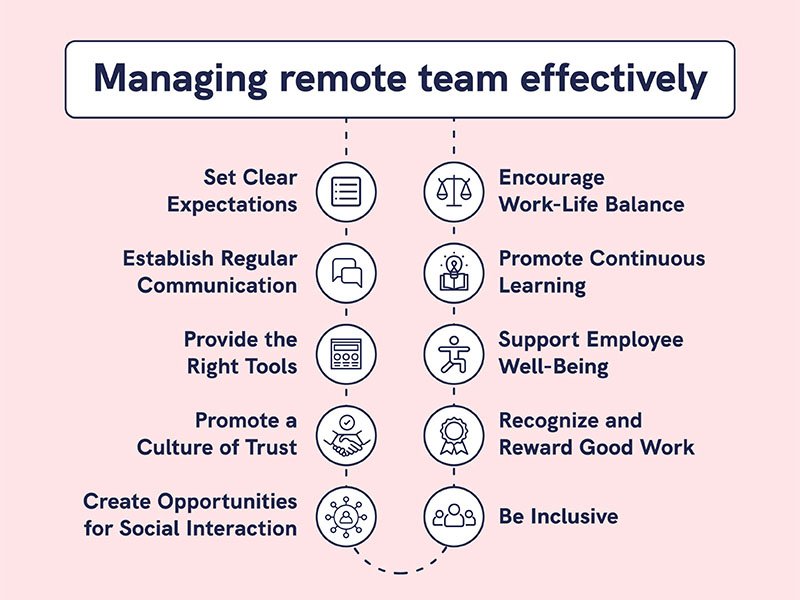
Technology alone does not guarantee successful remote teamwork. Businesses should also establish clear working practices.
Set Clear Communication Rules
Define which platform should be used for urgent messages, project discussions, meetings, and important announcements.
Create Clear Responsibilities
Every team member should understand their tasks, deadlines, and responsibilities.
Use Asynchronous Communication
Not every issue requires a meeting. Written updates and shared project information can help employees work across different schedules and time zones.
Keep Meetings Focused
Meetings should have a clear purpose and agenda. This can help reduce unnecessary interruptions.
Document Important Information
Store important processes, decisions, and project information in an accessible shared location.
Protect Company Data
Use strong passwords, appropriate access permissions, multi-factor authentication where available, and regular security practices.
Common Mistakes to Avoid
Remote teams can face problems when businesses use digital tools without a clear strategy.
Common mistakes include:
- Using too many communication platforms
- Holding unnecessary meetings
- Failing to document important decisions
- Ignoring cybersecurity
- Not training employees
- Creating unclear responsibilities
- Choosing software based only on popularity
- Failing to review whether tools are actually useful
The goal should be to create a simple and organized digital workplace rather than using as many tools as possible.
The Future of Remote Team Management
Remote team management is likely to become increasingly connected with artificial intelligence, automation, cloud collaboration, and advanced analytics.
AI-powered tools may help teams summarize meetings, organize information, automate repetitive tasks, and provide insights into project workflows.
At the same time, businesses will need to maintain a balance between productivity technology, employee privacy, communication quality, and workplace flexibility.
The future of remote work is likely to focus not only on where employees work but also on how effectively digital systems help them collaborate.
Conclusion
The right digital platforms for managing remote teams can make communication, collaboration, project management, and information sharing much easier.
Tools such as Slack, Microsoft Teams, Zoom, Trello, Asana, Notion, and Google Workspace serve different purposes and can be used individually or together depending on a team’s requirements.
However, businesses should avoid selecting tools simply because they are popular. The best technology setup depends on team size, workflow, budget, security requirements, and business goals.
By choosing practical platforms, establishing clear communication rules, and maintaining strong security practices, businesses can create a more organized and effective digital workplace for remote teams.
Frequently Asked Questions
What are the best digital platforms for remote teams?
Popular options include Slack, Microsoft Teams, Zoom, Trello, Asana, Notion, and Google Workspace. The right combination depends on the team’s specific communication and workflow needs.

star5vilogs@gmail.comEdit Profile