Comparing the Best Digital Platforms for App Development
Comparing the Best Digital Platforms for App Development
Mobile applications have become an important part of modern business and digital services. From e-commerce and banking to education, entertainment, healthcare, and communication, apps help organizations connect with customers and provide convenient digital experiences.
However, developing an app requires more than just an idea. Developers need the right tools, frameworks, development environments, and platforms to build, test, launch, and maintain applications.
Choosing the right app development platform can affect development speed, cost, performance, scalability, and user experience. In this guide, we compare the major types of digital platforms for app development and explain what businesses and developers should consider before making a decision.
What Are App Development Platforms?
An app development platform is a set of tools and technologies that helps developers create software applications for mobile devices, websites, desktops, or multiple platforms.
Depending on the technology, developers can use these platforms to:
- Write and manage code
- Design application interfaces
- Test applications
- Debug software
- Connect databases and APIs
- Build application packages
- Publish apps
- Monitor performance
- Maintain and update applications
Some platforms are designed specifically for one operating system, while others allow developers to build applications for multiple platforms using a shared codebase.
Why Choosing the Right App Development Platform Matters
Selecting an appropriate development platform can have a major impact on a project’s success.
The right platform can help reduce development time, simplify maintenance, improve application performance, and make it easier to scale the product.
On the other hand, choosing a platform without considering project requirements can lead to unnecessary development costs and technical challenges.
Before selecting a platform, developers should consider:
- Target devices
- Development budget
- Required features
- App performance
- Development skills
- Security requirements
- Scalability
- Maintenance needs
- Integration requirements
Types of App Development Platforms
There are several approaches to modern app development. Each has different advantages and limitations.
1. Native App Development
Native development involves creating applications specifically for a particular operating system.
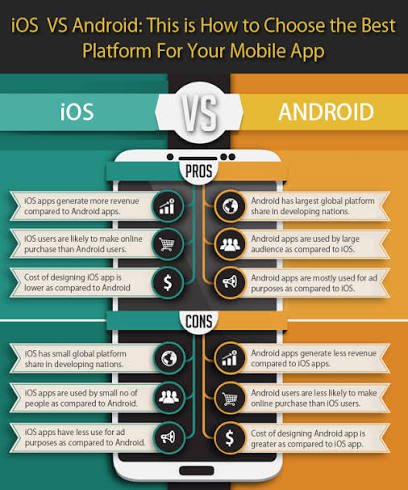
For example, developers may use Apple’s development tools for iOS applications and Google’s Android development tools for Android applications.
Advantages of Native Development
- Strong platform integration
- High performance
- Access to native device features
- Detailed control over the user experience
- Support for platform-specific capabilities
Limitations
- Separate development may be required for different platforms
- Development costs can be higher
- Maintaining multiple codebases can require additional resources
Native development can be useful when an application requires advanced platform-specific features or highly optimized performance.
2. Cross-Platform App Development
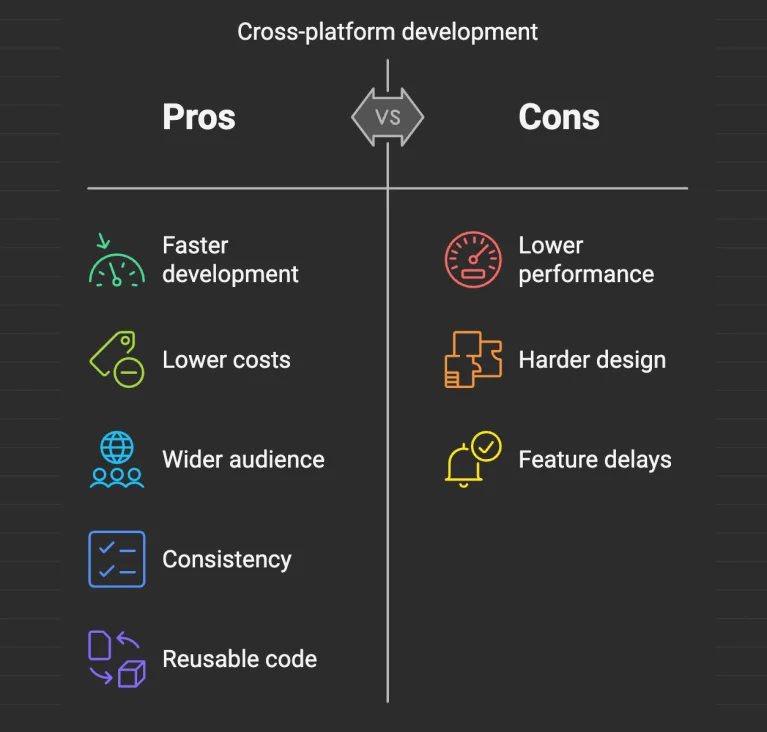
Cross-platform development allows developers to build applications for multiple operating systems using a shared codebase or development framework.
Popular cross-platform technologies include:
- Flutter
- React Native
- .NET MAUI
The exact capabilities and development experience vary between frameworks.
Advantages of Cross-Platform Development
- Shared code across platforms
- Potentially faster development
- Reduced duplication
- Easier maintenance for some projects
- Efficient use of development resources
Limitations
- Some platform-specific features may require additional work
- Performance can vary depending on the application
- Developers may still need platform-specific knowledge
Cross-platform development is often considered when a business wants to reach both Android and iOS users while managing development resources efficiently.
3. No-Code and Low-Code App Development
No-code and low-code platforms allow users to create applications with limited traditional programming.
These platforms typically provide visual interfaces, templates, drag-and-drop components, workflow builders, and prebuilt integrations.
Benefits
- Faster prototyping
- Lower technical barriers
- Useful for simple business applications
- Can reduce initial development time
- Allows non-developers to participate in app creation
Limitations
- Less customization than traditional development
- Platform dependency
- Advanced features may require custom code
- Complex applications can become difficult to manage
No-code and low-code tools can be useful for prototypes, internal business applications, and relatively straightforward digital products.
Popular Digital Platforms for App Development
Different development platforms serve different needs. Here are some widely used options and technologies.
Flutter
Flutter is a cross-platform UI toolkit developed by Google. It allows developers to create applications for multiple platforms from a shared codebase.
One of Flutter’s key features is its widget-based approach to building user interfaces.
Key Benefits of Flutter
- Cross-platform development
- Reusable UI components
- Fast development workflow
- Rich interface customization
- Single codebase for multiple targets
Flutter can be useful for startups and businesses that want to develop applications for multiple platforms.
React Native
React Native is a framework for building mobile applications using React and JavaScript or TypeScript.
It allows developers to share a significant amount of code between platforms while also providing ways to work with native platform features.
Key Benefits of React Native
- Cross-platform development
- Reusable components
- Large developer ecosystem
- Familiar technologies for React developers
- Ability to integrate native functionality
React Native can be a practical option for teams already familiar with JavaScript and React.
Android Development
Android app development uses Google’s Android development ecosystem and tools.
Developers can build applications specifically for Android devices and take advantage of Android platform features.
Benefits of Android Development
- Access to Android-specific capabilities
- Native performance
- Large global device ecosystem
- Flexible application development
Native Android development can be appropriate when an application is primarily designed for Android or requires deep platform integration.
iOS Development
iOS development focuses on applications for Apple’s platforms.
Developers can use Apple’s official development environment and tools to create applications designed specifically for the Apple ecosystem.
Benefits of iOS Development
- Strong integration with Apple devices
- Native performance
- Access to platform-specific APIs
- Detailed control over the user experience
Native iOS development can be appropriate for applications that require advanced Apple platform features.
.NET MAUI
.NET MAUI is Microsoft’s framework for building applications across multiple platforms using .NET.
It allows developers to use a shared codebase while targeting supported desktop and mobile platforms.
Benefits of .NET MAUI
- Shared development environment
- Integration with the .NET ecosystem
- Cross-platform application development
- Useful for teams already working with C# and .NET
App Development Platform Comparison
Choosing between different platforms depends on the requirements of the project.
| Feature | Native Development |